如何拦截 Youtube 广告
信息
本文适用于 iOS 版的 AdGuard,它是一种多功能广告拦截器,可在系统级别保护用户的设备。要了解其工作原理, 请下载 AdGuard 应用程序。
如何在 YouTube 应用中拦截广告
- 打开 YouTube 应用程序。
- 选择视频并点击「分享」。
- 点击「更多」,然后选择「拦截 YouTube 的广告(由 AdGuard 创建)」。
The video now opens in AdGuard’s ad-free player.
如何在 Safari 中拦截 YouTube 广告
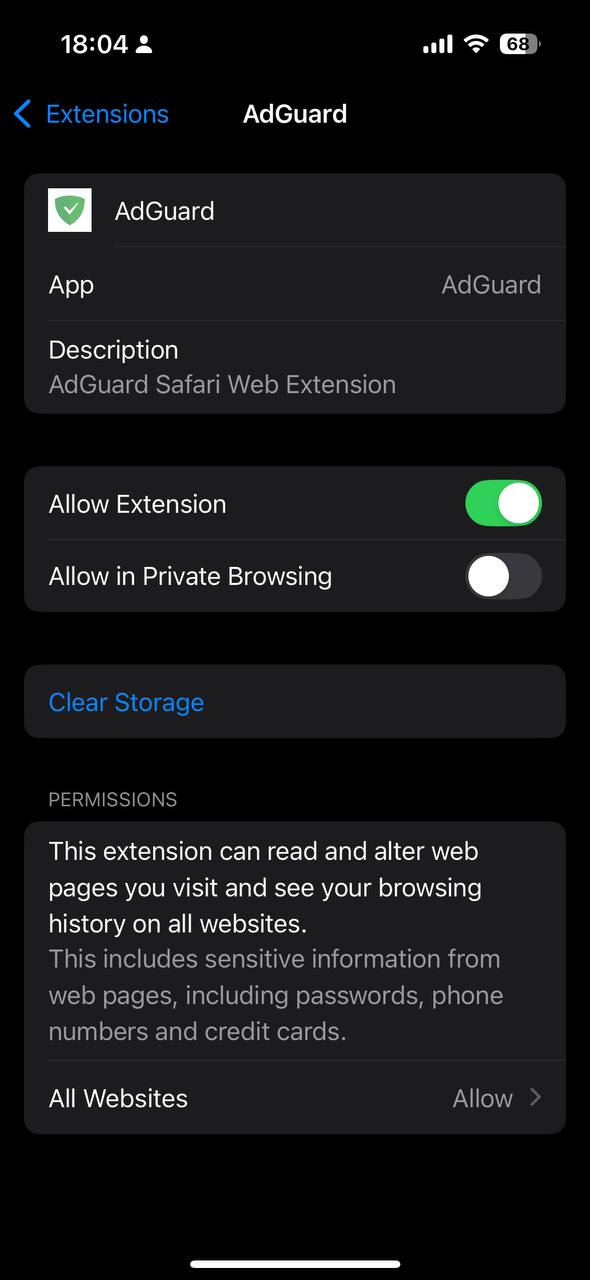
- Go to Safari → Extensions → AdGuard.
- Make sure Allow Extension is enabled. On the same screen, set the All Websites permission for AdGuard to Allow.
- Open AdGuard, tap the shield icon, and enable Advanced protection.
You can now watch YouTube videos in Safari without ads.