Safari 확장 프로그램
Safari 브라우저만 보호하는 Safari용 AdGuard에 관한 문서입니다. 전체 기기를 보호하려면 AdGuard 앱을 다운로드하세요.
Safari 확장 프로그램이란 무엇인가요?
Safari 확장 프로그램은 Safari 웹 브라우저에 기능을 추가하는 작은 소프트웨어 프로그램입니다. 이를 통해 사용자는 브라우저에 기본적으로 내장되어 있지 않은 기능을 추가하여 브라우징 환경을 개선할 수 있습니다. Safari용 AdGuard는 주로 확장 프로그램을 사용하여 Safari에서 열린 웹사이트에 필터링 규칙을 적용합니다.
작동 방식
웹사이트의 광고, 트래커 및 방해 요소를 차단하기 위해 AdGuard는 필터링 규칙을 사용합니다. AdGuard의 규칙과 사용자 저의 필터는 Safari에서 이해할 수 있는 규칙으로 변환되어 6개의 Safari 확장 프로그램에 통합됩니다:
- AdGuard General
- AdGuard Privacy
- AdGuard Social
- AdGuard Security
- AdGuard Custom
- AdGuard Other
각 콘텐츠 차단 확장 프로그램에는 최대 15만 개의 활성 필터링 규칙이 포함될 수 있습니다. 대부분의 필터 그룹 내 규칙 수는 15만 개를 넘지 않습니다. 그러나 언어별 또는 사용자 정의 필터를 너무 많이 활성화하면 한도를 초과할 수 있습니다. 이러한 경우 한도를 초과하는 임의의 규칙은 자동으로 비활성화되어 잘못된 차단으로 이어질 수 있습니다. We strongly recommend activating only the filters you need.
There is also one more extension responsible for other features: AdGuard for Safari, which adds the AdGuard icon next to the search bar in Safari and allows using advanced rules to block complex ads.
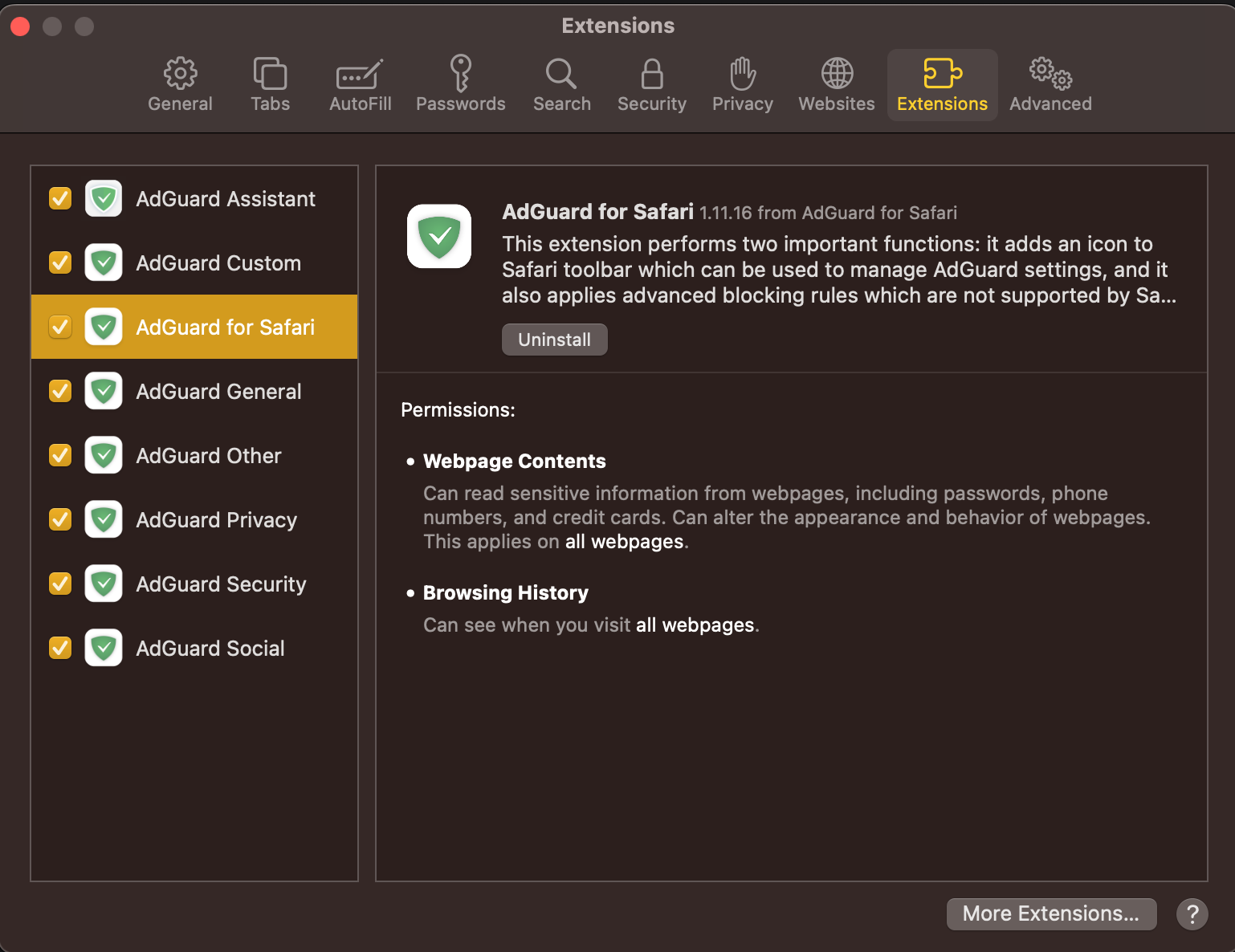
아래에서 각 확장 프로그램에 대해 자세히 알아보세요.
콘텐츠 차단 확장 프로그램
AdGuard General applies rules from filters that you can find in Filters → Ad blocking and Filters → Language-specific. 이 확장 프로그램은 포괄적인 광고 차단에 중점을 두며 특정 언어의 광고에 대한 필터를 포함합니다.
AdGuard Privacy applies rules from filters located in Filters → Privacy. 추적 메커니즘을 차단하고 브라우징 활동을 비공개로 유지합니다.
AdGuard Social applies rules from filters that can be found in Filters → Social Widgets and Filters → Annoyances. 웹 페이지에서 팝업, 소셜 미디어 버튼, 온라인 지원 창 및 기타 성가신 요소를 차단합니다.
AdGuard Security applies rules from filters under Filters → Security. 이 확장 프로그램은 잠재적으로 유해한 요소를 식별하고 차단하여 악성 콘텐츠로부터 사용자를 보호합니다.
AdGuard Other applies rules from filters that that don't fall under the above-mentioned categories and that are located in Filters → Other: Filter unblocking search ads and self-promotion, AdGuard DNS filter, and AdGuard Experimental filter.
AdGuard Custom applies rules from filters that you add on your own to Custom filters.
사용자 규칙과 허용 목록 규칙은 모든 확장 프로그램에 포함되어 있습니다.
Safari용 AdGuard
AdGuard for Safari activates the AdGuard icon next to the search bar. 특정 웹사이트에 대한 보호 기능을 빠르게 설정하거나 수동으로 광고를 차단하려는 경우 유용합니다. 또한 Safari에서 지원되지 않는 형식으로 변환되지 않는 고급 규칙도 포함되어 있습니다. These include CSS rules, extended CSS selectors, and scriptlets, which allow AdGuard to block complex ads, such as those on YouTube.
Safari용 확장 프로그램 관리 방법
-
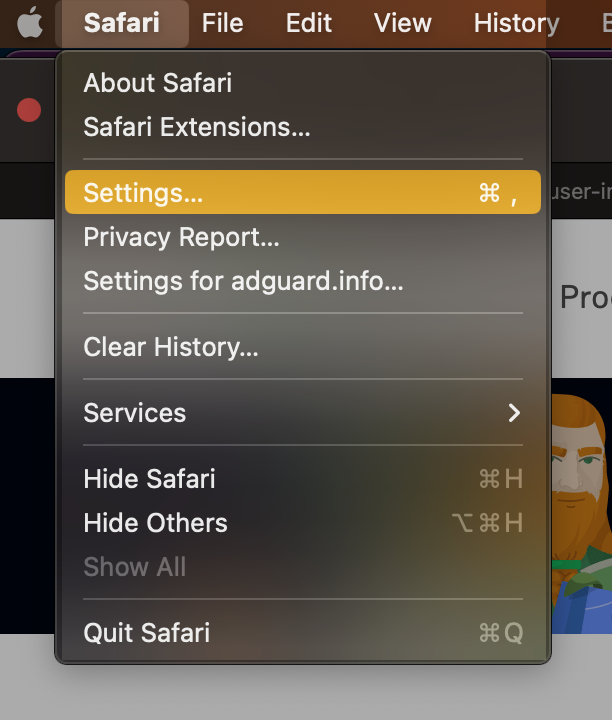
Open Safari and click Safari in the upper left corner of the screen to expand the menu.
-
Click Settings...
-
Select Extensions.

Safari용 AdGuard에 권한이 필요한 이유
When enabling the AdGuard for Safari extension, you might notice that it requires access to web page content and access to browsing history. 이러한 권한이 필요한 이유는 다음과 같습니다.
- 수동 광고 차단 및 고급 차단 규칙이 올바르게 작동하려면 웹페이지 콘텐츠에 액세스해야 합니다.
- 웹사이트의 보호 상태를 확인하고 어떤 고급 규칙을 적용해야 하는지 결정하려면 검색 기록에 액세스해야 합니다.
당사는 이 데이터를 다른 목적으로 사용하거나 누구와도 공유하지 않습니다. For more info, you can consult our Privacy policy.