Erweiterungen
Benutzerskripte
Benutzerskripte (wir nennen sie auch „Erweiterungen“) sind im Grunde genommen in JavaScript geschriebene Miniprogramme. Sie ändern oder erweitern die Funktionalität einer oder mehrerer Websites. Viele AdGuard-Benutzer sind vielleicht bereits mit Benutzerskripten wie AdGuard Assistant, Popup Blocker und AdGuard Extra vertraut.
AdGuard kann die Funktionalität einer Website erheblich erweitern, indem er als Benutzer-Script-Verwaltung fungiert. You can add your custom scripts or manage the existing ones in our three products: AdGuard for Windows, AdGuard for Android, and AdGuard for Mac.
Empfohlene AdGuard-Skripte
Diese Benutzerskripte stammen direkt von AdGuard und wir können garantieren, dass sie effektiv und sicher sind. Für einige der von anderen entwickelten Benutzerskripte, die wir für gut und zuverlässig halten, blättern Sie nach unten zum nächsten Abschnitt. Sie können auch einige der beliebten Websites mit Skripten unten finden, aber bedenken Sie, dass Sie sich einem gewissen Risiko aussetzen, wenn Sie ein Benutzerskript von einer unbekannten Quelle herunterladen, da einige Skripte schädlich für Ihren Computer sein können.
AdGuard Extra
Eine Erweiterung, die Werbung in schwierigen Fällen blockiert, wenn der übliche filterbasierte Ansatz nicht ausreicht. AdGuard Extra ist in den Einzelanwendungen von AdGuard vorinstalliert, mit Ausnahme der Anwendung für iOS, sodass Sie nichts tun müssen, um es zu aktivieren. Wenn Sie es jedoch zusammen mit AdGuard Browsererweiterung oder einem anderen Werbeblocker verwenden möchten, müssen Sie eine zusätzliche Erweiterung verwenden. Erfahren Sie mehr auf GitHub über dieses Benutzerskript und wie man es installiert.
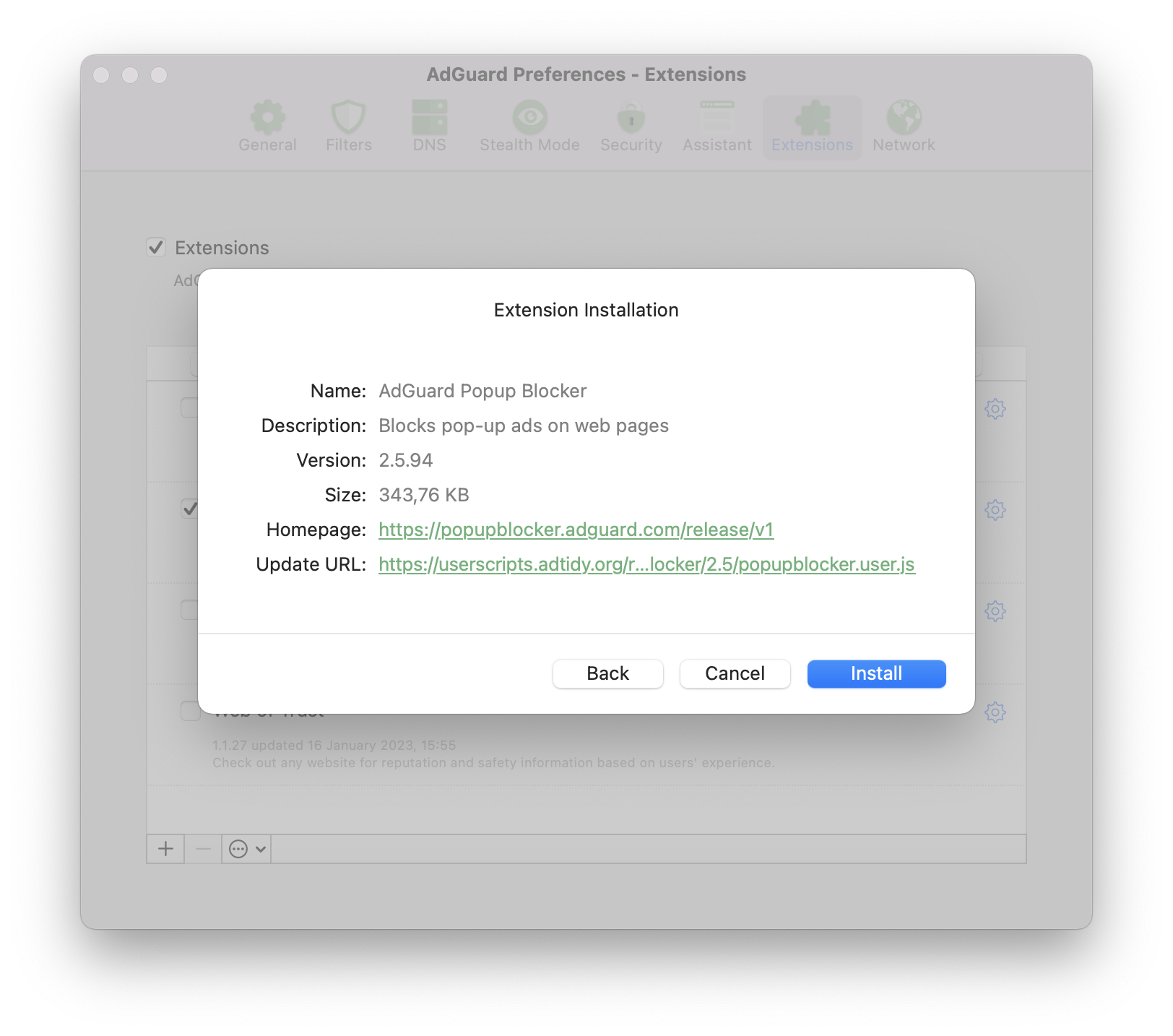
AdGuard Pop-up-Blocker
Der Name spricht für sich selbst: Es sperrt Popups — eine der lästigsten Arten von Werbung auf Websites. Erfahren Sie mehr auf GitHub über dieses Benutzerskript, dessen Hauptmerkmale und Installation.
AdGuard-Assistent (alte Version)
Diese benutzerdefinierte Erweiterung wurde entwickelt, um das Filtern direkt von der Browserseite aus zu steuern (manuelles Sperren, Zulassen von Listen usw.).
Diese Version des Assistenten ist veraltet und es ergibt keinen Sinn, sie auf neuen Systemen zu verwenden, da sie durch den vollwertigen [Browser-Assistenten] (https://adguard.com/adguard-assistant/overview.html) ersetzt wurde. Der bisherige Assistent kann jedoch nützlich sein, wenn es keinen Browser-Assistenten für Ihren Browser gibt. Wenn dies bei Ihnen der Fall ist, können Sie auf GitHub erfahren, wie Sie den AdGuard Assistenten installieren.
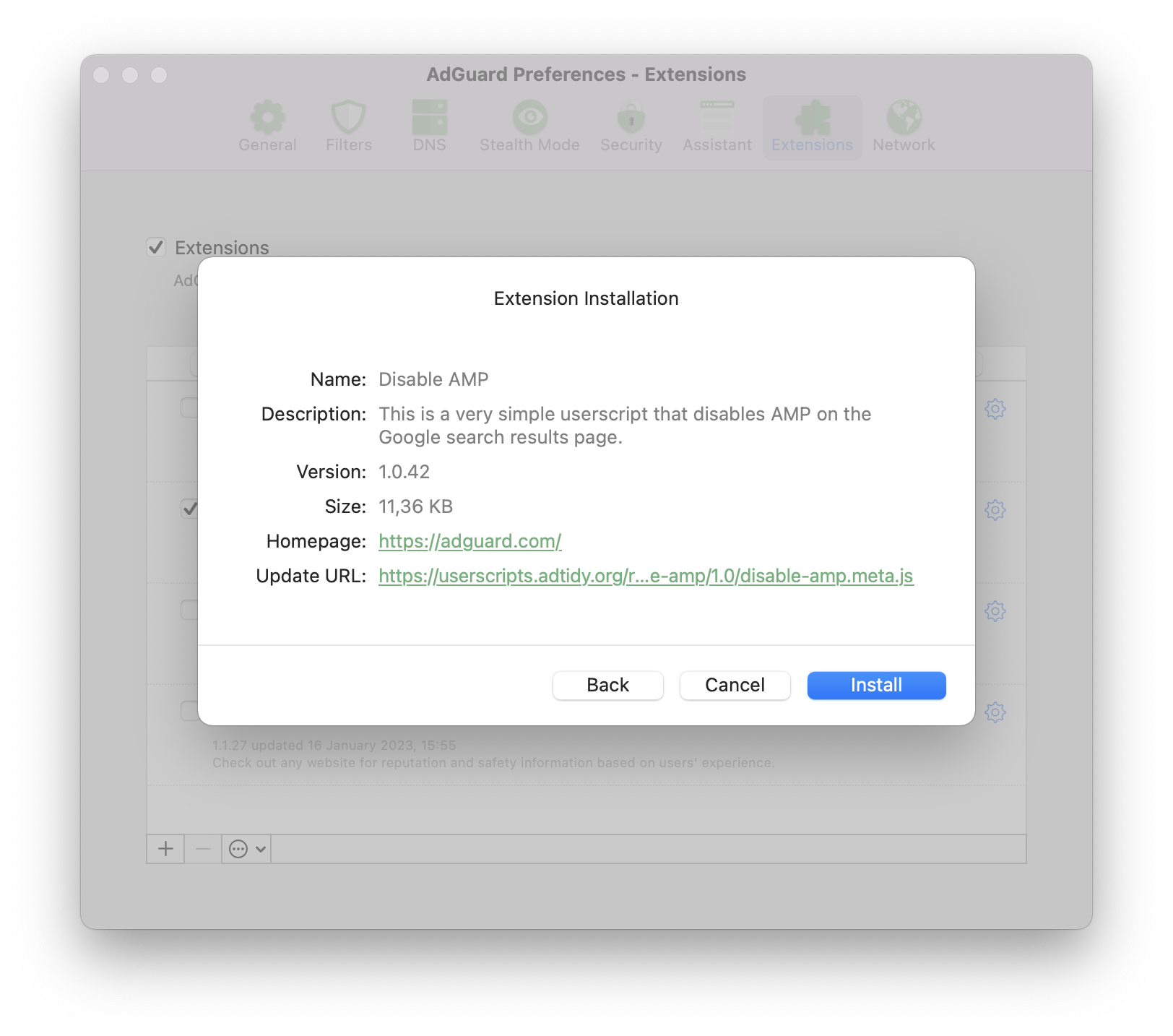
AMP deaktivieren
Ein Skript, das nur in AdGuard für Android vorinstalliert ist. Es deaktiviert AMP (Accelerated Mobile Pages) auf der Google-Suchergebnisseite. Erfahren Sie mehr auf GitHub über dieses Benutzerskript und wie man es installiert.
Beste Tipps außerhalb von AdGuard
Diese Benutzerskripte werden nicht von AdGuard entwickelt und daher können wir keine 100%ige Garantie geben, dass sie sicher sind und/oder jederzeit funktionieren. Unserer Erfahrung nach verdienen sie jedoch eine Empfehlung, weil sie alle ihren guten Ruf verdient haben.
Don't track me Google
Dieses Skript entfernt die Tracking-Funktion von Google aus den Links in den Google-Suchergebnissen. Sie beschleunigt das Laden der Suchergebnisse und ermöglicht es Ihnen, mit der rechten Maustaste zu klicken oder zu tippen, um die Link-URL zu kopieren.
Der Quellcode ist auf GitHub verfügbar. Dieses Benutzerskript kann von GreasyFork heruntergeladen und in jeder AdGuard CoreLibs-basierten Anwendung installiert werden.
SponsorBlock
SponsorBlock überspringt bezahlte Werbeblöcke in YouTube-Videos. Dadurch wird Zeit gespart, da Sie direkt zum Hauptinhalt gelangen und keine Unterbrechungen durch Werbung und Eigenwerbung mehr auftreten.
Dieses Benutzerskript kann ausschließlich auf unseren Desktop-Anwendungen AdGuard für Windows und AdGuard für Mac genutzt werden.
Zum Ausprobieren:
- Öffnen Sie https://mchangrh.github.io/sb.js/.
- Klicken Sie auf Generate link.
- Kopieren Sie den angezeigten Link.
- Öffnen Sie AdGuard und wechseln Sie zu Erweiterungen → Erweiterung hinzufügen → Aus Datei oder URL importieren.
- Fügen Sie den kopierten Link ein und bestätigen Sie.
tinyShield
tinyShield is primarily designed for Korean websites protected by Ad-Shield, but it also supports many international websites that use the same ad anti-adblocking technology. This userscript can be installed in AdGuard CoreLibs-based apps, Violentmonkey, Tampermonkey, and quoid/userscripts. Learn more about tinyShield and how to install it on GitHub.
Wo kann man weitere Benutzerskripte erhalten?
Da Benutzerskripte hauptsächlich von Enthusiasten erstellt werden, sollten Sie bei deren Installation vorsichtig sein. Jedes Skript aus einer unbekannten Quelle birgt ein potenzielles Risiko. Es gibt jedoch eine Vielzahl interessanter Skripte, die, wenn sie sorgfältig und verantwortungsbewusst installiert werden, die Nutzung einiger Websites wirklich bequemer machen können.
Im Folgenden werden einige der beliebtesten Benutzerskript-Kataloge beschrieben.
Userscript.Zone
Userscript.Zone ist eine Website, die die Suche nach Benutzerskripten durch Eingabe einer passenden URL oder Domain ermöglicht. Die Website ist einfach zu bedienen und hat ein hohes Maß an Glaubwürdigkeit, da nur Skripte von moderierten Seiten angezeigt werden.
Greasy Fork
Greasy Fork ist ein Benutzerskript-Katalog von Stylish-Entwicklern. Die Skripte in diesem Katalog werden moderiert, so dass ihre Glaubwürdigkeit entsprechend höher ist.
OpenUserJS.org
OpenUserJS.org ist ein quelloffener Benutzerskript-Katalog, der in nodeJS geschrieben ist. Dieser Katalog wird nicht moderiert, achten Sie also auf verdächtige Skripte.
NamuLink
NamuLink is an open-source userscript that removes Naver PowerLink advertisements from NamuWiki by bypassing the site's advanced link obfuscation mechanisms. The project is maintained by the AdGuard team and the broader ad-blocking community.
Crackle
Crackle is an open-source userscript designed to remove ads and bypass anti-adblock measures on the Chzzk web platform. It detects and replaces ad-related responses used by Chzzk’s advertising systems with compatible ad-free responses and disables pre-roll and mid-roll video ads.
Community
If you like the idea of customizing your browser with userscripts and have questions, you can ask them on one of these websites:
Development
Request license
If you are developing your own userscript and want to test how it works with AdGuard, you can request a license by filling in the form.
Compatibility
Metadata block
Supported properties
@name@namespace@description@version@match@include@exclude@grant@connect@require@resource@downloadURL@updateURL@homepage,@homepageURL,@source,@website@run-at@noframes@icon,@iconURL,@defaulticon@icon64,@icon64URL
Unsupported properties
These properties will be simply ignored by AdGuard.
Supported GM functions
AdGuard supports both old GM_ functions and new GM4 API that use GM object.
All listed old Greasemonkey functions are deprecated but still supported.
GM.info,GM_infoGM.setValue,GM_setValueGM.getValue,GM_getValueGM.listValues,GM_listValuesGM.deleteValue,GM_deleteValueGM.getResourceUrl,GM_getResourceURLGM.setClipboard,GM_setClipboardGM.xmlHttpRequest,GM_xmlhttpRequestGM.openInTab,GM_openInTabGM.notificationunsafeWindowGM_getResourceTextGM_addStyleGM_logGM.addElement,GM_addElementwindow.onurlchange
You can find more information about Greasemonkey API in its manual.
Beispiel
// ==UserScript==
// @name            Name as shown to the user when locale is english or unknown
// @name:ru         Name as shown to the user when locale is russian
// @description     Description as shown to the user when locale is english or unknown
// @description:ru  Description as shown to the user when locale is russian
// @icon            https://myhomepage.com/myuserscript.png
// @version         1.0.0.0
// @downloadURL     https://dl.myhomepage.org/myuserscript.user.js
// @updateURL       https://dl.myhomepage.org/myuserscript.meta.js
// @homepageURL     https://myhomepage.com/myuserscript
// @include         *
// @exclude         *://website.com/*
// @resource        https://myhomepage.com/myuserscript.css
// @require         https://myhomepage.com/mylibrary.js
// @grant           property:settings
// @grant           GM_getValue
// @grant           GM_setValue
// @grant           GM_deleteValue
// @grant           GM_listValues
// @grant           GM_getResourceText
// @grant           GM_getResourceURL
// @grant           GM_addStyle
// @grant           GM_log
// @grant           GM_setClipboard
// @grant           GM_xmlhttpRequest
// @grant           unsafeWindow
// @grant           GM_info
// @grant           GM_openInTab
// @grant           GM_registerMenuCommand
// @grant           GM_addElement
// @grant           window.onurlchange
// @run-at          document-start
// ==/UserScript==
!function(){(
    console.log("I am loaded!");
)}();
Trusted Types API
AdGuard provides an instance of the PolicyApi class that allows you to manage Trusted Types in your userscripts.
You can access the instance of this class by using the ADG_policyApi variable in your userscript.
Properties
name: string— a name of the policy (Default is"AGPolicy").isSupported: boolean— a flag indicating whether or not the Trusted Types API is supported by the current browser.
Polyfilled methods
ADG_policyApi.createHTML. If not supported, returnsinput: string.ADG_policyApi.createScript. If not supported, returnsinput: string.ADG_policyApi.createScriptURL. If not supported, returnsinput: string.ADG_policyApi.getAttributeType. If not supported, returnsnull.ADG_policyApi.getPropertyType. If not supported, returnsnull.ADG_policyApi.isHTML. If not supported, returnsfalse.ADG_policyApi.isScript. If not supported, returnsfalse.ADG_policyApi.isScriptURL. If not supported, returnsfalse.
Additional Types
/**
 * Enum representation of the return values of the `getAttributeType` and
 * `getPropertyType` methods of the native Trusted Types API.
 *
 * @see {@link https://developer.mozilla.org/en-US/docs/Web/API/TrustedTypePolicyFactory/getAttributeType}
 * @see {@link https://developer.mozilla.org/en-US/docs/Web/API/TrustedTypePolicyFactory/getPropertyType}
 */
enum TrustedType {
    HTML = 'TrustedHTML',
    Script = 'TrustedScript',
    ScriptURL = 'TrustedScriptURL',
}

// You can access it like that inside of userscript
ADG_TrustedType.HTML // "TrustedHTML"

/**
 * Isomorphic trusted value type. If a browser supports the Trusted Types API, it will be one of the enum Trusted Types
 * (`TrustedHTML`, `TrustedScript` or `TrustedScriptURL`); otherwise, it will be regular `string`.
 *
 * @see {@link https://developer.mozilla.org/en-US/docs/Web/API/TrustedHTML}
 * @see {@link https://developer.mozilla.org/en-US/docs/Web/API/TrustedScript}
 * @see {@link https://developer.mozilla.org/en-US/docs/Web/API/TrustedScriptURL}
 */
type TrustedValue = string | TrustedHTML | TrustedScript | TrustedScriptURL;
Additional methods
/**
 * Creates a Trusted Type depending on `type`:
 * - `TrustedHTML`
 * - `TrustedScript`
 * - `TrustedScriptURL`
 * - or returns `value` if none of them is applicable.
 *
 * @param type          Trusted Type.
 * @param value         Value from which a Trusted Type is created.
 * @param createArgs    Additional arguments to be passed to the function represented by `TrustedTypePolicy`.
 * @returns             Created value.
 */
function create(
    type: TrustedType,
    value: string,
    ...createArgs: unknown[]
): TrustedValue


// Example: Creates TrustedHTML
const trustedHTML = ADG_policyApi.create(ADG_TrustedType.HTML, '<div></div>');

/**
 * Converts `value` of `attribute` into one of the Trusted Types:
 * - `TrustedHTML`
 * - `TrustedScript`
 * - `TrustedScriptURL`
 * - or returns `value` if none of them is applicable.
 *
 * @param tagName       Name of an HTML tag.
 * @param attribute     Attribute.
 * @param value         Value of an attribute to be converted.
 * @param elementNS     Element namespace. If empty, defaults to the HTML namespace.
 * @param attrNS        Attribute namespace. If empty, defaults to null.
 * @param createArgs    Additional arguments to be passed to the function represented by `TrustedTypePolicy`.
 * @returns             Converted value.
 */
function convertAttributeToTrusted(
    tagName: string,
    attribute: string,
    value: string,
    elementNS?: string,
    attrNS?: string,
    ...createArgs: unknown[]
): TrustedValue

// Example: Converts to TrustedScriptURL
const trustedScriptURL = ADG_policyApi.convertAttributeToTrusted("script", "src", 'SOME_URL');
scriptElement.setAttribute("src", trustedScriptURL);

/**
 * Converts `value` of `property` into one of the Trusted Types:
 * - `TrustedHTML`
 * - `TrustedScript`
 * - `TrustedScriptURL`
 * - or returns `value` if none of them is applicable.
 *
 * @param tagName       Name of an HTML tag.
 * @param property      Property.
 * @param value         Value of a property to be converted.
 * @param elementNS     Element namespace. If empty, defaults to the HTML namespace.
 * @param createArgs    Additional arguments to be passed to the function represented by `TrustedTypePolicy`.
 * @returns             Converted value.
 */
function convertPropertyToTrusted(
    tagName: string,
    property: string,
    value: string,
    elementNS?: string,
    ...createArgs: unknown[]
): TrustedValue

// Example: Converts to TrustedHTML
divElement.innerHTML = ADG_policyApi.convertPropertyToTrusted("div", "innerHTML", "<div></div>");
Matching SPA sites
This section only applies to AdGuard for Windows, AdGuard for Mac, AdGuard for Android, and AdGuard for Linux with CoreLibs v1.19 or later.
Many modern websites, such as YouTube, utilize Single Page Application (SPA) capabilities. Unlike traditional web applications, the page does not reload when navigating between pages. Instead, the content is updated dynamically using JavaScript, allowing for a smoother user experience.
On such websites, a userscript is invoked only once when the @match or @include directives are matched (unless @exclude is matched). Due to the nature of SPAs, the userscript cannot be re-invoked on subsequent page changes because the global JavaScript context remains the same. To address this issue, userscripts can use the @grant window.onurlchange directive.
// ==UserScript==
// @name SPA
// @namespace spa
// @version 1.0.0
// @match https://*/*
// @grant window.onurlchange
// @run-at document-start
// ==/UserScript==

// via window.onurlchange
window.onurlchange = (event) => {
    console.log('URL changed to:', event.url);
};

// via window.addEventListener('urlchange')
window.addEventListener('urlchange', (event) => {
    console.log('URL changed to:', event.url);
});
This will allow userscripts to listen for URL changes and handle them accordingly.
The urlchange event is only triggered for full URL changes, such as a change in the path or query, but not for fragment (hash) changes.
Examples:
- Navigation from
https://example.com/page1tohttps://example.com/page2will trigger the event. - Navigation from
https://example.com/page1?query=1tohttps://example.com/page1?query=2will trigger the event. - Navigation from
https://example.com/page1#section1tohttps://example.com/page1#section2will NOT trigger the event.
The window.onurlchange and window.addEventListener('urlchange', ...) APIs are non-standard. To use them, you must explicitly grant them in your userscript with @grant window.onurlchange.
If a website uses hash routing, userscripts can use the native DOM hashchange event:
// ==UserScript==
// @name SPA
// @namespace spa
// @version 1.0.0
// @match https://*/*
// @run-at document-start
// ==/UserScript==

// via window.onhashchange
window.onhashchange = (event) => {
    console.log(`Hash changed from "${event.oldURL}" to "${event.newURL}"`);
};

// via window.addEventListener('hashchange')
window.addEventListener('hashchange', (event) => {
    console.log(`Hash changed from "${event.oldURL}" to "${event.newURL}"`);
});
Userstyles
Userstyles allow users to change the appearance of popular websites.
AdGuard has the option to upload or create your own userstyles. This is an advanced feature, so you will need some knowledge of HTML and CSS.
Currently, two AdGuard apps allow you to create and manage userstyles: AdGuard for Windows (v7.19 or later) and AdGuard for Mac (v2.16 or later). We also plan to implement this new feature in AdGuard for Android v4.8 in the nearest future.
This is an experimental feature, so if you encounter any problems while adding or creating a userstyle, please contact our support team at support@adguard.com.
How to set up a userstyle in AdGuard
You can download userstyles from various websites. One of the most popular userstyle websites is https://userstyles.world/, which we will use as an example for the following instructions on how to set up the userstyle in AdGuard.
-
Follow the link above and choose the userstyle you like
-
Click Copy next to the userstyle address
-
Open AdGuard settings → Extensions
-
Press the [+] button and paste the userstyle link
-
Fertig!
If you’re familiar with CSS rules, you can also create userstyles yourself.
We don’t support userstyles that contain @var or @advanced in the metadata. AdGuard also doesn’t support @preprocessor without the default value.
-
Open AdGuard settings → Extensions
-
Press the [+] button and choose the Create userstyle option. A new window will appear on your screen
-
To create a userstyle, first write the title with metadata, for example
/* ==UserStyle==@name New userstyle@version 1.0==/UserStyle== */ -
Write the CSS part after the meta data. AdGuard supports website domain names matching (
@-moz-document domain(…), …). Zum Beispiel:body {background: gray;}Or:
@-moz-document domain('example.org'),domain('example.net'),domain('example.com') body {background: gray;} -
Once you’re finished, press Save and Close. Your new userstyle has been successfully added to AdGuard
Beispiel
/* ==UserStyle==
@name         Example userstyle
@namespace    https://example.org/userstyle
@homepageURL  https://example.org/userstyle
@version      1.0.0
@license      Other
@description  This is an example
@author       example
@preprocessor default
==/UserStyle== */
@-moz-document regexp("https?\:\/\/(www\.)?example\.(org|com).*") {
    body {
        background-color: #000000 !important;
    }
}